Jun 20 · 2:00 PM
Interview scheduled
The next step was added to the application history.
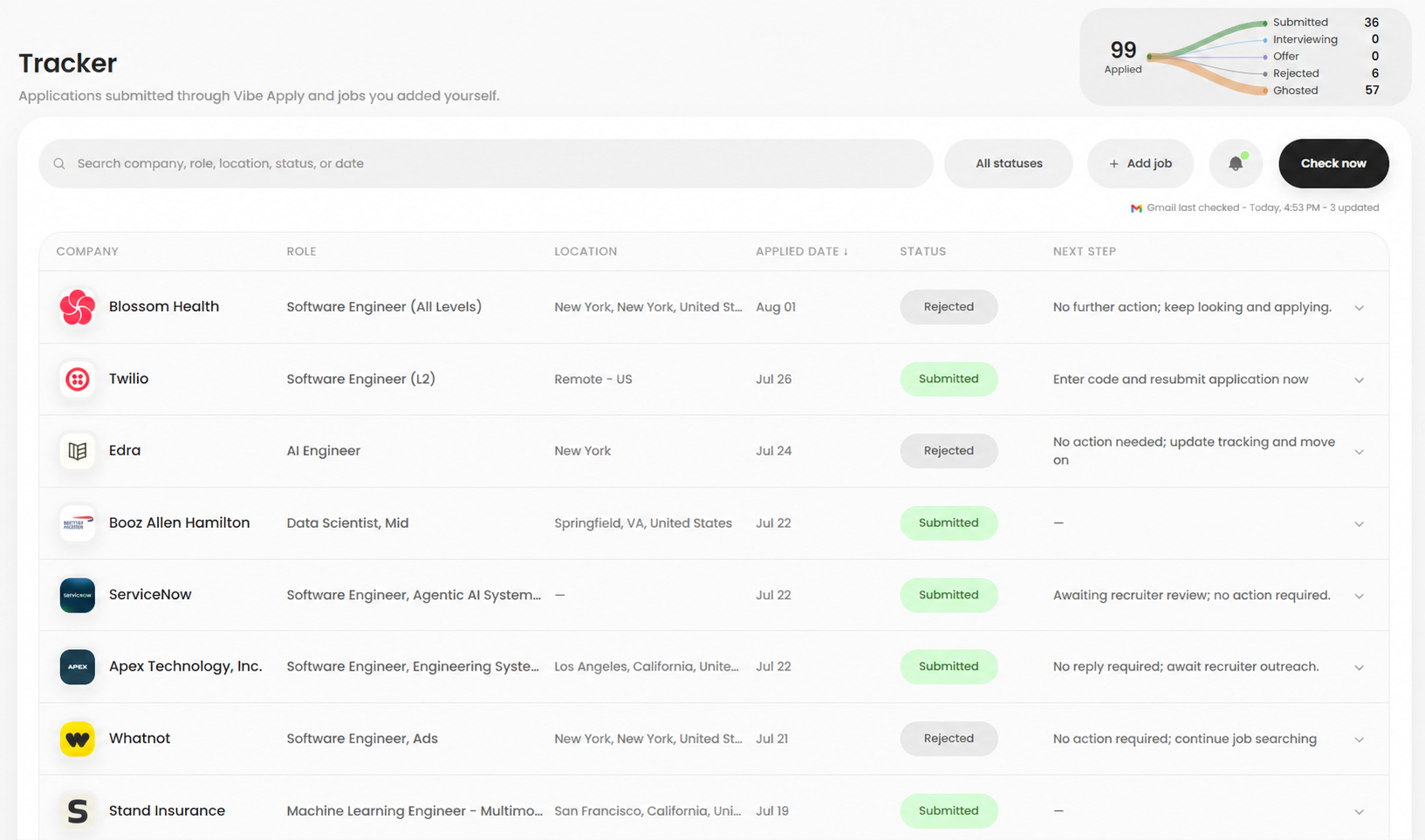
Track applications from AI Apply and jobs you add yourself. Follow status changes, submitted resumes, application answers, and next steps in one organized dashboard.
Editor
Role
Senior Product Designer
Company
Northstar Labs
Achievement
AI rewriteLed a redesign that improved onboarding completion by 28% and reduced time to value.
Senior Product Designer
Experience
Senior Product Designer
Northstar Labs
2022—Now
Led a redesign that improved onboarding completion by 28% and reduced time to value.
Skills
.svg-AOORAu1G.png) Inbox
Inboxno-reply
Thank you for applying to Google

recruiting
Your Stripe interview invitation

Stripe
Interviewingcareers
An update on your Microsoft application

Microsoft
OfferYour inbox becomes part of Tracker. Vibe Apply matches relevant confirmations, interview invitations, offers, rejections, and follow-up messages to the right application. The agent updates the status, records each change in the application history, and keeps your next steps organized without copying details from Gmail into another spreadsheet.
Jun 20 · 2:00 PM
The next step was added to the application history.
Jun 18 · 9:30 AM
A recruiter email changed the status to Interviewing.
Jun 12 · 10:05 AM
A confirmation email was matched to this role.
Jun 12 · 10:02 AM
AI Apply completed and submitted the application.
Each job keeps a chronological record of its submission, confirmation, status changes, interviews, offers, and next steps, so the complete application history remains easy to understand and revisit.
When Vibe Apply identifies a relevant Gmail message, it connects the update to the matching company and role, placing agent actions and changes you make within the same ordered timeline.
Open any application to see what happened and when, confirm its latest status, revisit the submitted resume and application details, and prepare your next follow-up with all the context together.
Add applications completed outside Vibe Apply so every role, status change, interview, and next step still lives in one Tracker.
Add to Tracker
Company
Stripe
Job title
Product Design Lead
Date applied
August 2, 2026
Status
AppliedAdd the job.
Add external applications manually with the company, role, location, job posting, date applied, and current status. Whether you applied through an employer website, referral, recruiter, or another job board, the opportunity joins the same Tracker and remains visible throughout your job search.
Keep the record.
Keep notes, interview details, submitted resumes, application answers, compensation information, contacts, and next steps attached to the correct job. This gives you a reliable application record to revisit before recruiter conversations, interviews, follow-ups, and future status changes.
Follow the updates.
Manually added jobs remain searchable and filterable beside applications completed by AI Apply. Change the status yourself or let relevant Gmail signals update the history when confirmations, interview invitations, offers, rejections, follow-ups, or other employer messages arrive.
Track every way you apply. Vibe Apply brings automatic job applications and manually added roles into one organized job application tracker. Jobs completed by the AI agent sit beside applications from employer websites, referrals, recruiters, and other job boards, keeping your complete job search visible without separating outside applications from agent-submitted roles. A unified view also makes it easier to compare opportunities and understand where every application originated.
Keep the complete application record. Save the company, role, date applied, status, submitted resume, application answers, notes, interviews, contacts, and next steps together. The activity timeline shows what changed, when it happened, and how the hiring process is progressing, giving you the details needed before a recruiter call, interview, or follow-up. Return later to see exactly what you submitted and which conversation should happen next.
Let inbox signals keep it current. Update application statuses yourself or optionally connect Gmail so confirmations, interview invitations, offers, rejections, and follow-up messages can be matched to the right job as employer updates arrive. Each relevant inbox signal becomes part of the application history instead of remaining disconnected inside your email. Open the record to review the message, its resulting status change, and the surrounding timeline together.
Move beyond the spreadsheet. Search and filter applications by company, role, status, or date without maintaining scattered spreadsheet rows and tabs. See what is submitted, interviewing, offered, rejected, ghosted, or waiting for a response, then use the organized view to focus on the jobs that need your attention next. This makes follow-ups, interview preparation, and weekly job-search reviews easier to manage from one dashboard.
Yes. You can add external applications manually so your Tracker can remain the central record of your job search.
No. Gmail connection is optional. You can use the Tracker and update application statuses manually without connecting your inbox.
When authorized, Vibe Apply can review relevant job-search emails to help identify new application confirmations and status signals such as interview activity or rejection messages.
When that information is available, the application record keeps the base or tailored resume connected to the role for later reference.